All articles
Getting started
Planning
Links
Guides
- UTM naming conventions for teams and agencies
- UTM parameters explained
- Campaign launch without broken links
- Planning QR codes for print
- Switch agencies without losing data
- Google Campaign URL Builder or a UTM builder for teams
- UTM links for agencies: running client campaigns cleanly
- UTM management: what it is and when a team needs it
- UTM parameters in Google Ads, Meta and LinkedIn
- Why UTM parameters get lost: redirects, consent and scripts
- GA4 Unassigned traffic: why campaigns land there and how to fix it
Set up your own short domain
Instead of fnwrk.com, short links and dynamic QR codes can run under a subdomain of your company, for example go.your-company.example
Live
. The company's admins set this up, up to three own short domains per workspace. Agencies do not see the section.
What you need
- A subdomain, not a main domain:
go.your-company.exampleworks,your-company.exampledoes not. - Access to your domain's DNS records, or someone in your IT who adds two records.
Step by step
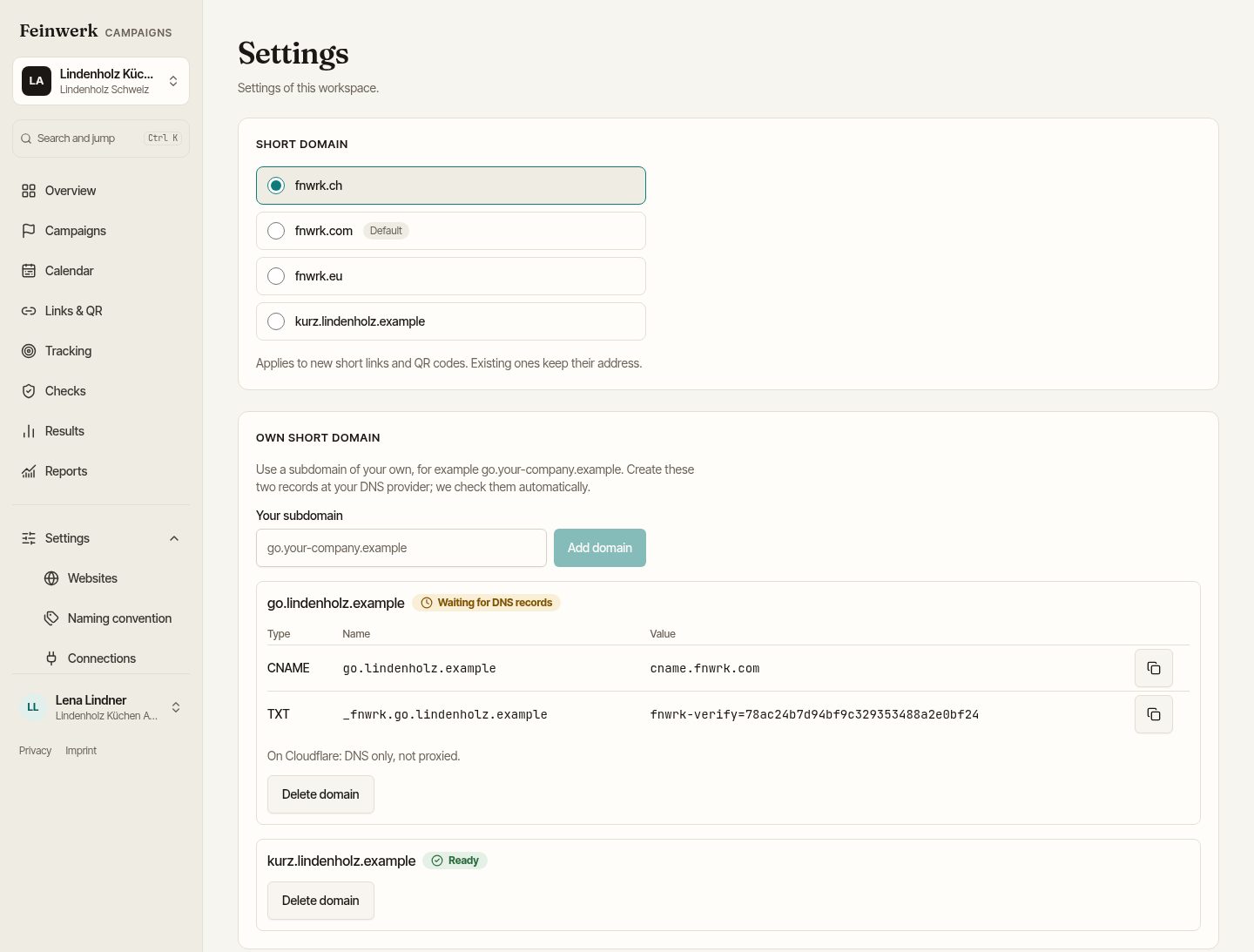
- Open Settings and go to the section Own short domain.
- Enter the address under Your subdomain and choose Add domain.
- The page shows two records with copy buttons. Add both at your DNS provider:
- CNAME: name
go.your-company.example, valuecname.fnwrk.com - TXT: name
_fnwrk.go.your-company.example, valuefnwrk-verify=with the code the page shows
- CNAME: name
- Wait. The platform checks the records every 5 minutes, for up to 7 days. Then it sets up the certificate.
- When the domain shows Ready, choose it at the top in the section Short domain for new short links and QR codes.
Whoever added the domain gets a mail once it is ready or if the setup fails. The TXT record is needed only for the first check; you may delete it afterwards. The CNAME stays.
What the states mean
- Waiting for DNS records: the platform has not found the records yet. DNS changes often take a few minutes, sometimes hours.
- DNS records not found: check names and values, then choose Check again.
- Setting up certificate: the records fit, the certificate is being created.
- Ready: the domain can be chosen.
- Setup failed: please contact support.
Delete a domain
Delete domain works only as long as no short link has used the domain, because printed codes must keep working. The platform then removes the domain within a few minutes; afterwards you can delete the CNAME at your DNS provider.
Example
Lindenholz Küchen sets up kurz.lindenholz.example. The IT adds the CNAME to cname.fnwrk.com and the TXT record; after a few minutes the domain shows Ready. Anna Beispiel chooses it under Short domain, and the next poster gets the address kurz.lindenholz.example/herbst.
Without a short address, or with an unknown one, your short domain only says that this link does not exist. If your workspace ends, the short links keep redirecting like those of the platform as long as your CNAME points to us. So leave it in place as long as printed codes are in circulation.
With Cloudflare: DNS only, not proxied through Cloudflare. Otherwise the platform cannot set up the certificate. For the certificate, Let's Encrypt receives the name of the subdomain; it then appears in public certificate logs. More in the platform privacy policy.