All articles
Getting started
Planning
Links
Guides
- UTM naming conventions for teams and agencies
- UTM parameters explained
- Campaign launch without broken links
- Planning QR codes for print
- Switch agencies without losing data
- Google Campaign URL Builder or a UTM builder for teams
- UTM links for agencies: running client campaigns cleanly
- UTM management: what it is and when a team needs it
- UTM parameters in Google Ads, Meta and LinkedIn
Links for ad networks
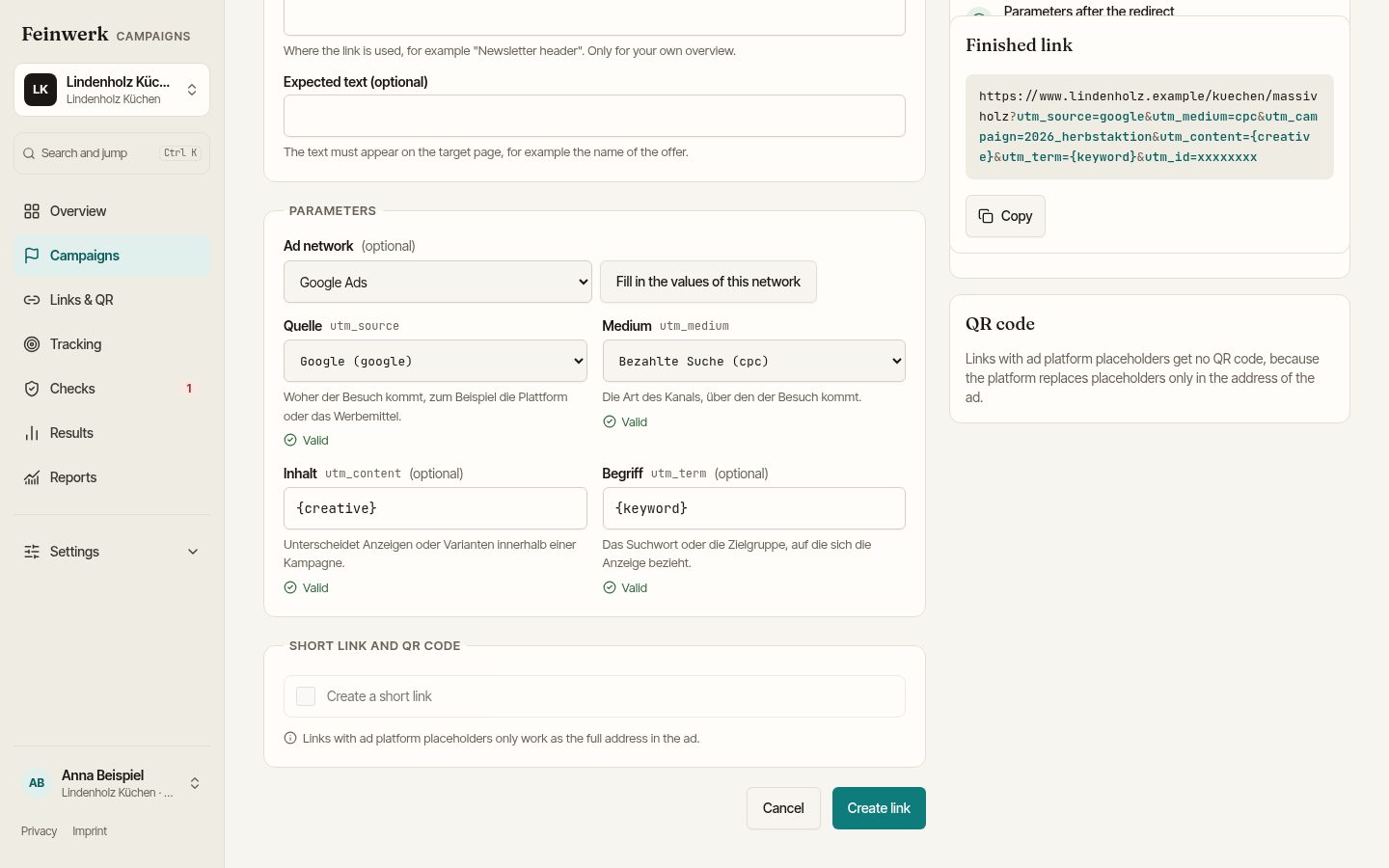
For ads in ad networks, the link builder fills in the network's values: source, medium and the placeholders that the network replaces with its own values on the click, such as {keyword} in Google Ads or {{ad.name}} in Meta. The link page then shows what to copy into which field of the ad.
You can choose Google Ads, YouTube (through Google Ads), Microsoft Advertising, Meta (Facebook and Instagram), LinkedIn, X, TikTok, Pinterest, Criteo, Taboola, Outbrain and Xing.
Step by step
- Create a New link as usual, see Create a tracking link.
- In the Parameters box, choose the network under Ad network. The field is optional; None leaves everything as before.
- Click Fill in the values of this network. If fields already hold values, the platform asks Overwrite the values? With Overwrite, the network's values replace your entries.
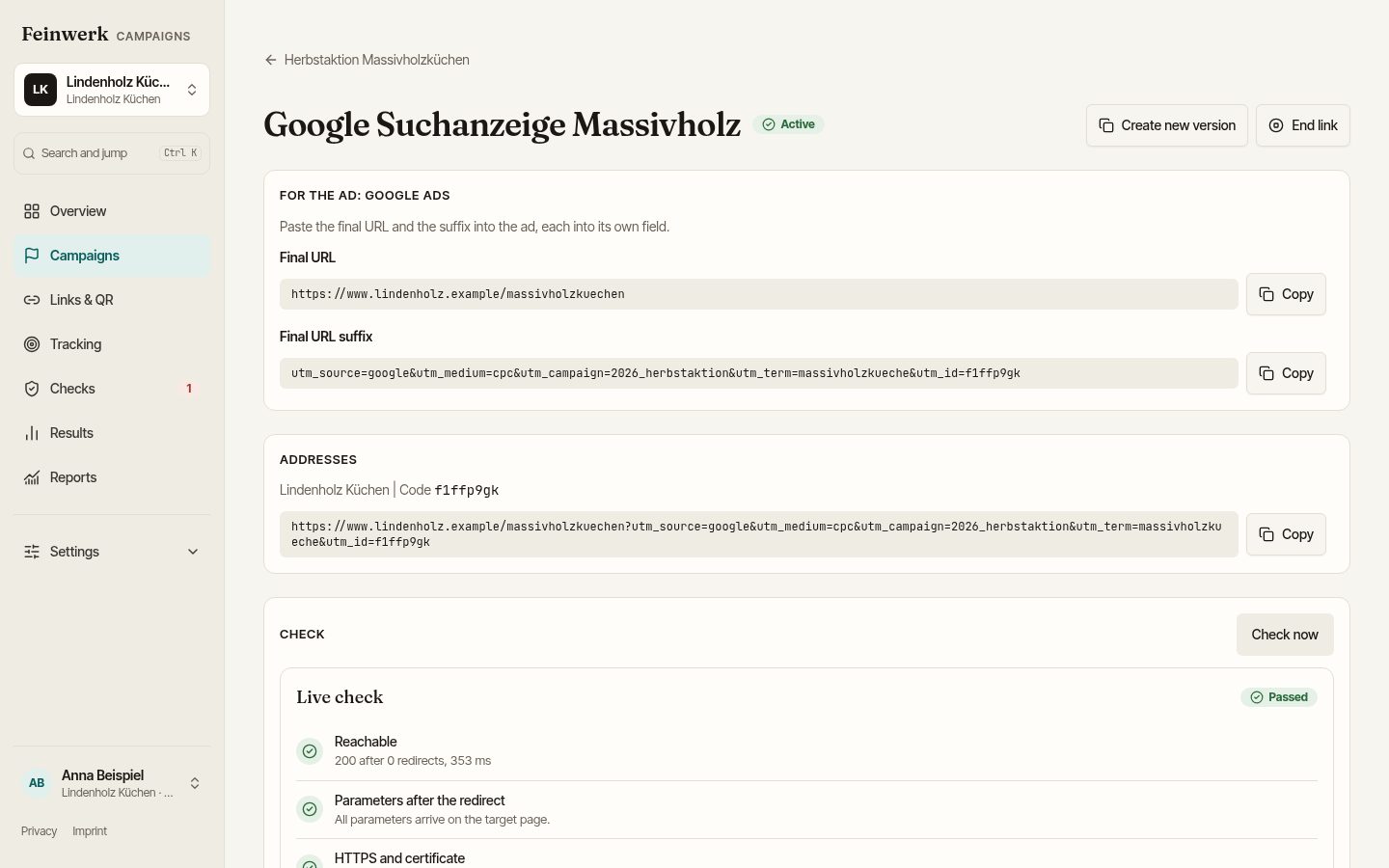
- Save the link. At the top of the link page you now see the box For the ad with the network's name.
- Copy each part with Copy into the matching field of the ad.
If a source or medium of the network is missing from your convention, the field shows Missing in your convention. Admins get a link to the naming convention from there. People who may request values use Request the value, see Request and approve values. Everyone else asks a company admin to add the value.
What goes into which field
| Network | Fields on the link page | Where they go |
|---|---|---|
| Google Ads, YouTube, Microsoft Advertising | Final URL and Final URL suffix | each into the field of the same name in the ad |
| Meta (Facebook, Instagram) | Website URL and URL parameters | each into the field of the same name in the ad |
| all others | Full address | into the field for the destination address |
Google, Microsoft and Meta have two fields for this and append the parameters to the destination address themselves when they serve the ad. Below the box, the usual Addresses box with the full link stays in place.
Placeholders
The network replaces placeholders on the click, not Feinwerk Campaigns. That is why two rules apply:
- Source, medium and campaign stay fixed values from your convention. Otherwise the report shows as many campaigns as there are ads.
- Content and term may hold placeholders, also as part of a value, for example
anzeige_{creative}.
The defaults every workspace starts with:
| Network | Source | Medium | Content | Term |
|---|---|---|---|---|
| Google Ads | google |
cpc |
{creative} |
{keyword} |
| YouTube | youtube |
video |
{creative} |
|
| Microsoft Advertising | bing |
cpc |
{AdId} |
{keyword} |
| Meta | facebook |
paid-social |
{{ad.name}} |
|
linkedin |
paid-social |
|||
| TikTok | tiktok |
paid-social |
__CID_NAME__ |
Pinterest, Criteo, Taboola and Outbrain also come with a placeholder for the ad. X and Xing do not replace placeholders in links; there, content and term stay fixed values. LinkedIn fills its own campaign values when you switch on dynamic UTM parameters in Campaign Manager.
Links with ad platform placeholders only work as the full address in the ad. They get no short link and no static QR code, because the platform only replaces placeholders in the address it sees itself.
Defaults for your company
Under Settings, Naming convention has the section Ad networks. Everyone sees there which networks are active. Company admins set source, medium, content and term per network (Edit), restore the default (Reset) or switch a network off with Active. Source and medium must be plain values from your lists; content and term may hold placeholders of the network.
New workspaces start with a convention that already contains the sources x, pinterest, criteo, taboola, outbrain and xing and the medium native.
Why fixed values and placeholders are split this way is explained in the guide UTM parameters in Google Ads, Meta and LinkedIn.